
Buying a domain name that has already expired without looking into what it was used for before is a simple way to hurt a website without anyone noticing. I have seen this happen many times. The website looks fine at first, but it has a lot of problems you cannot see, and nobody realises what is going on until the website starts to perform poorly in search results months later.
This is what SpamZilla is supposed to stop from happening. So I wanted to try it out and see if it really works. I used it for three weeks with domain names in different areas to find out if it is still good, in 2025 or if it is just something that sounds good but does not actually do anything.
Here is what I found out about SpamZilla.
So I logged in, and the first thing I noticed!
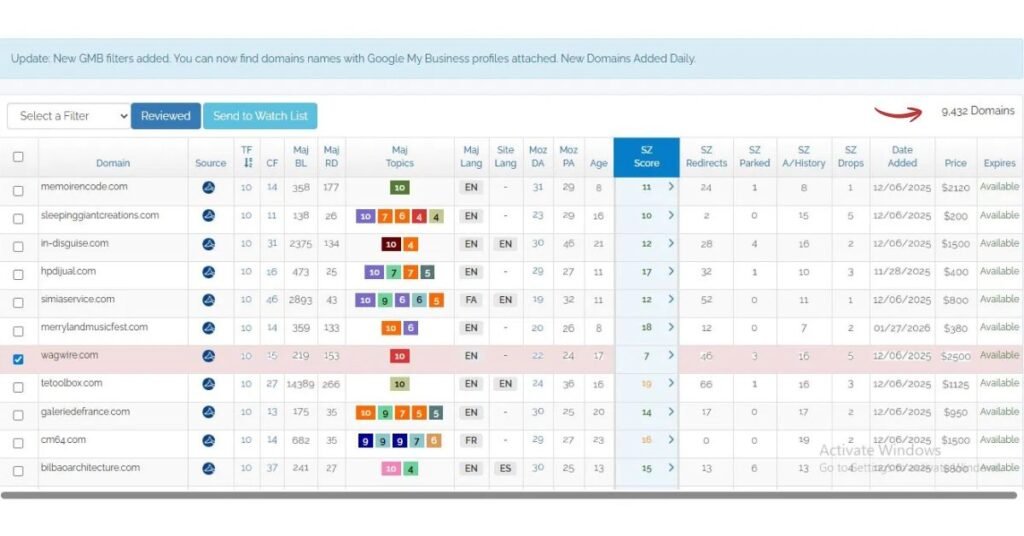
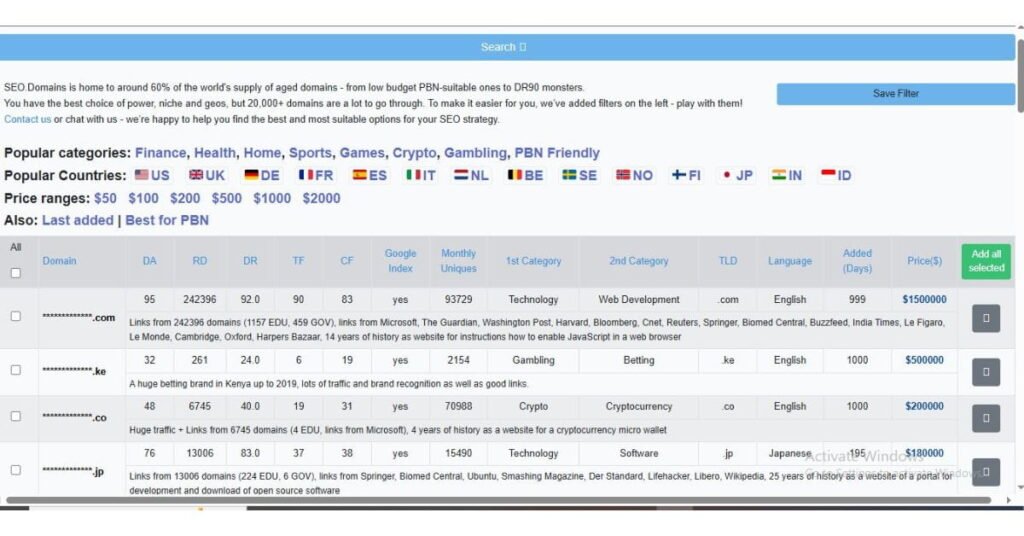
Just after logging in, the dashboard presented me with everything I needed in one place – domain table with such columns as TF, CF, referring domains, domain age, Moz DA, and SZ Score. On the left-hand side, a complete filtering panel with TLDs, Majestic, and Ahrefs data included. In the upper-right corner – the total number of domains equaling 29 million.
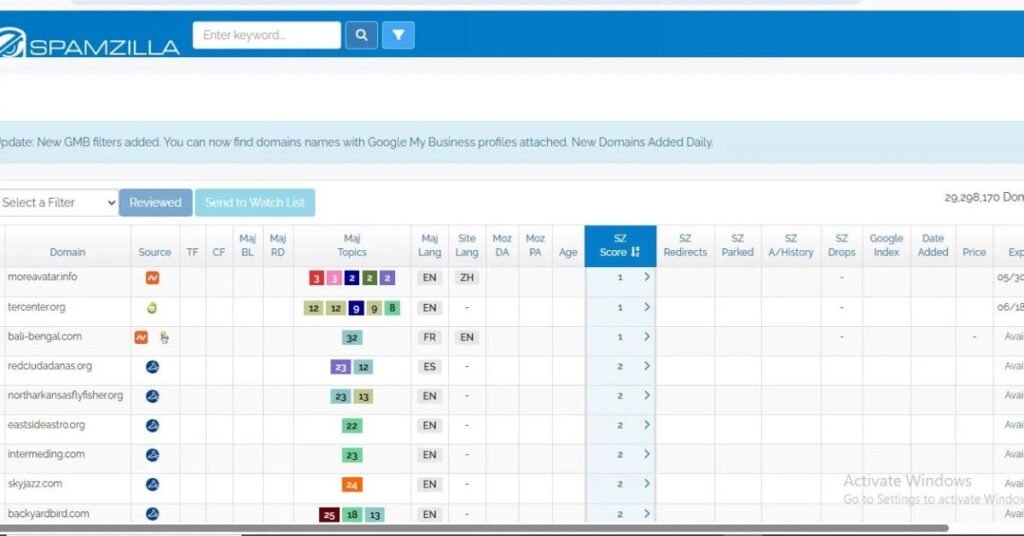
One thing that really caught my eye in the beginning was its speediness. Just loading the page without any lags, providing the user with data and possibility of filtering within seconds.
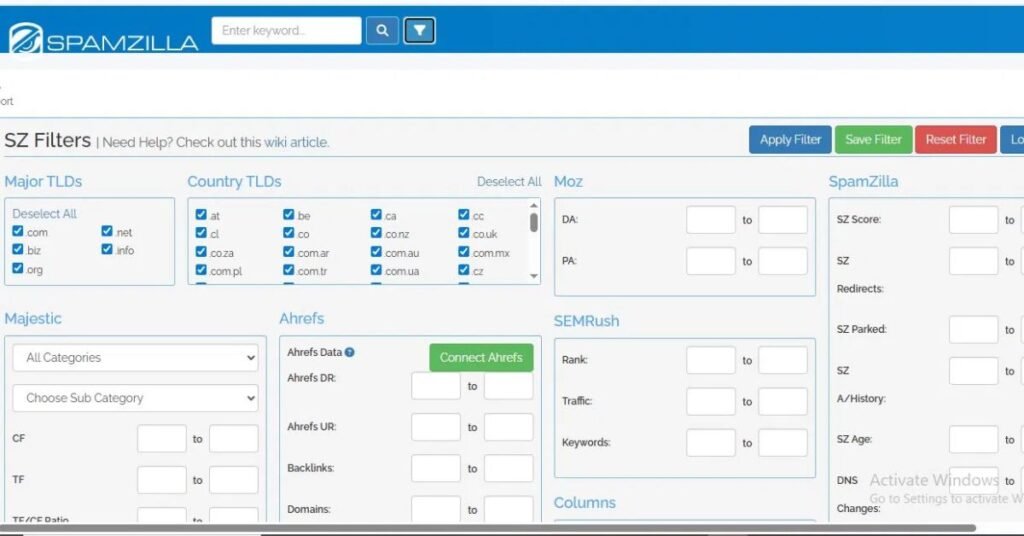
Filtering panel is basically the place where all the action takes place. For those who have never used SpamZilla before, it might seem too much of a task. But once you get familiar with what filters you need, it will become quick for you.
Here’s How I Actually Tested It on Some Domains
I used SpamZilla for three weeks. I tried it with different kinds of websites, like health, finance and home improvement websites. I also tried it with some hobby websites. I did not want to find the website in each category. I just wanted to see how SpamZilla works with kinds of websites and where it is good and where it is not.
After a while, I spent two days doing the thing by hand. I used ExpiredDomains.net to get the websites. Then I checked each website with Majestic and Wayback Machine. This comparison was really helpful. It was one of the best parts of the test.
I was able to see how SpamZilla works. It was interesting to compare it to doing it by hand with SpamZilla and the other tools.
What My Filtering Process Looked Like?
The database shows around 29 million domains without any filters applied. That number is not useful on its own. The value of SpamZilla is almost entirely in how well you filter it down.
My starting setup for every session: TF minimum 10, CF minimum 10, SZ Score between 0 and 20, dot com TLDs only.
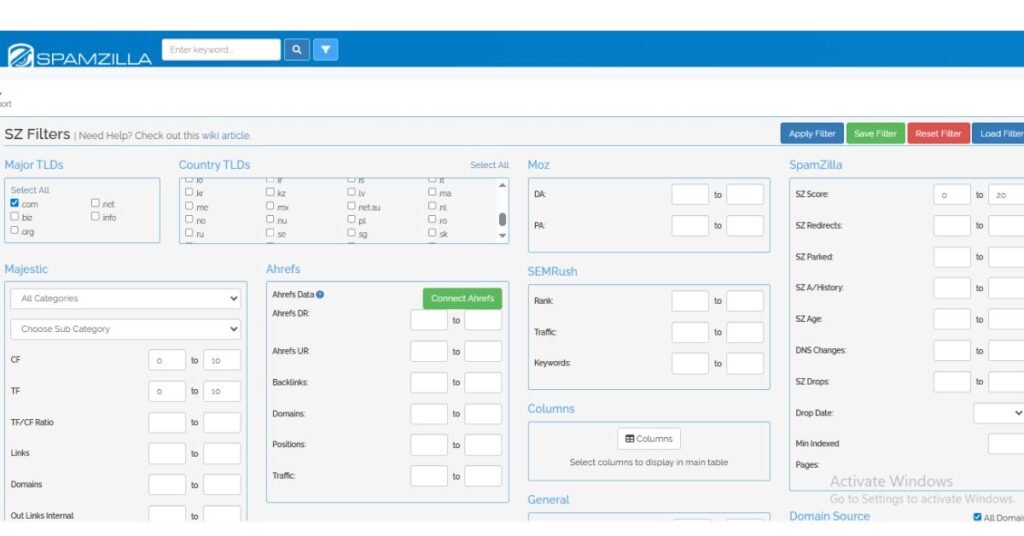
With those filters applied, the list came down to 9,432 domains. That’s still a big number, but now it actually feels manageable. I am not wasting time on low-quality domains. I am only checking ones that have a chance.
SpamZilla takes out the domains for me. This really saves me a lot of work that I would have to do by hand.
After Checking More Than 40 Domains, Here Is What I Found
I spent over three weeks checking 40 domains really carefully. I did not just take a quick look at them. I opened up each domain I checked its history on the Wayback Machine I looked at the anchor text and for the domains I double checked them in Ahrefs.
Out of those 40 domains 30 domains were good enough to make it to my shortlist.. From those 30 domains, just 25 domains were actually strong enough for me to think about buying them.
I have to say that is a good result. Most people who do this kind of thing by hand would have stopped halfway. Started taking shortcuts. But SpamZilla kept everything organized so I was able to go through all 40 SpamZilla results properly. SpamZilla made it easy for me to do that.
SpamZilla does not change the ratio of domains to bad domains. It just helps you get rid of the domains faster so you can focus on the domains that actually matter the good domains.
One Example Where a “Good” Domain Didn’t Turn Out So Good
This is the part that really matters, and most people ignore it.
I was checking domains. I found sailboat-technology.com. At first, it looked good. TF 10, CF 15, 263 referring domains, and SZ Score 20. It passed my filters, so I did not see anything
Then I looked at the details.
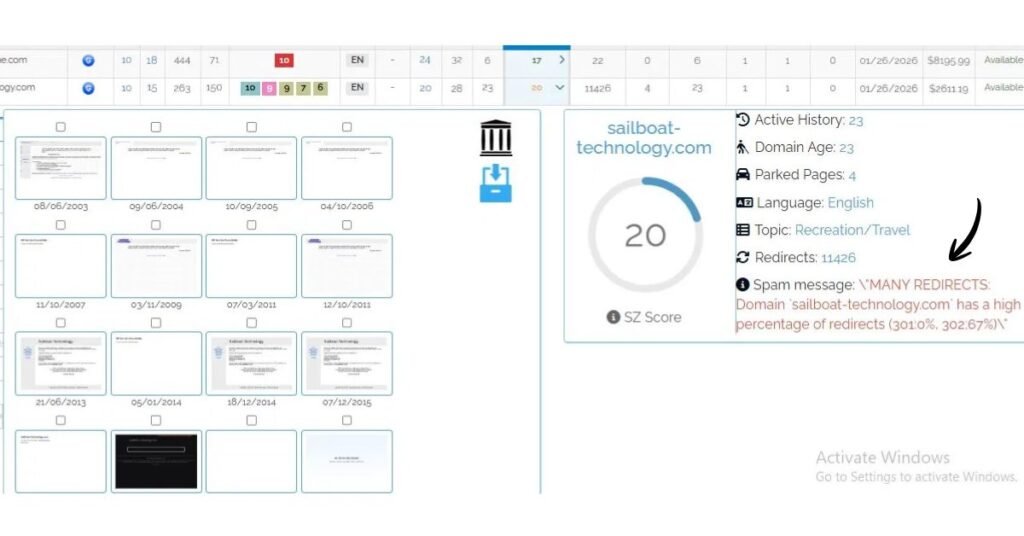
SpamZilla showed a warning. It said there were than 11,000 redirects and most of them were 302 redirects. That does not seem normal. Usually it means the domain was used for spam.
The problem is, the score still showed 20 so it passed.. The warning clearly showed that something was wrong. Most people would miss this. They just look at the score. Move on. I almost did that too.
So I checked the Wayback Machine.
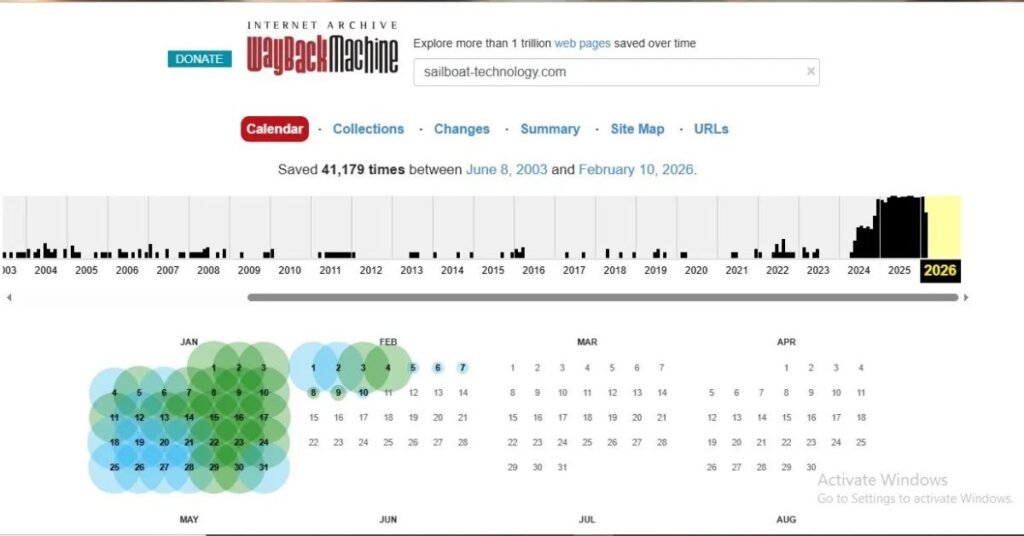
The website had over 41,000 snapshots, which’s a lot. There was an increase in snapshots right before it expired. This is not typical, for a website. Usually it means the site was used for spam or had automated activity.
SpamZilla did give a warning. The score did not give the whole picture. So the lesson here is do not trust the domain score. Always look at the warning. Check the Wayback Machine before making a decision.
Also check: How Long Do Dental Cleanings Take? Complete Guide For Patients
There Is a Tab Most People Never Open
The sailboat technology example shows us something. SpamZilla has a lot of data that people do not really use. People always look at the score and the important numbers. They usually ignore the tabs below them.
When you click on a domains SZ Score some tabs open up under the results table. There is one tab that I had been ignoring for two years. It is the Anchors tab.
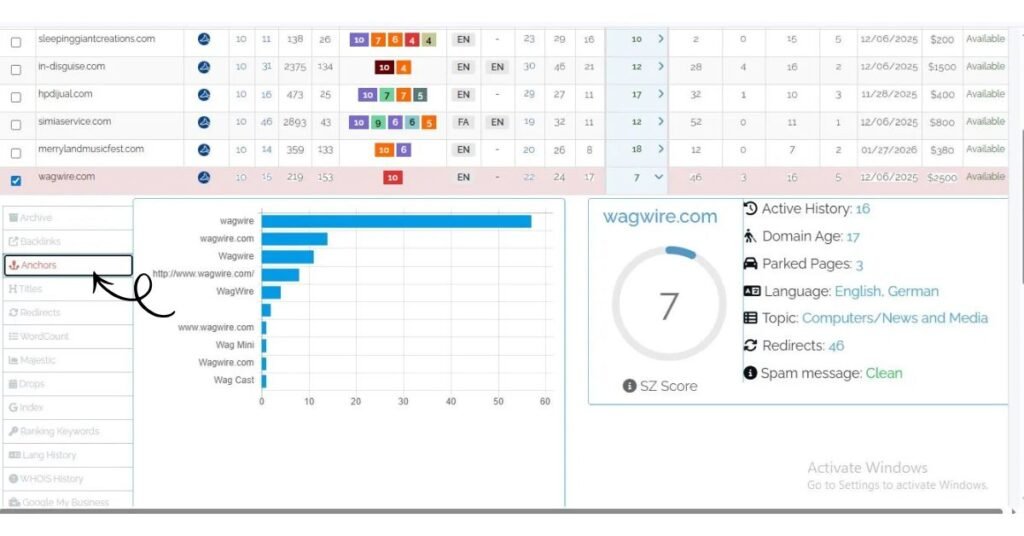
A healthy backlink profile shows a natural mix — branded anchors, generic terms, naked URLs. What a manipulated profile looks like is different: 40 or 50 percent of anchors are exact-match commercial terms. “Best payday loans.” “Cheap car insurance quotes.” That distribution does not come from editorial linking. It comes from deliberate anchor text stuffing, usually as part of a link scheme.
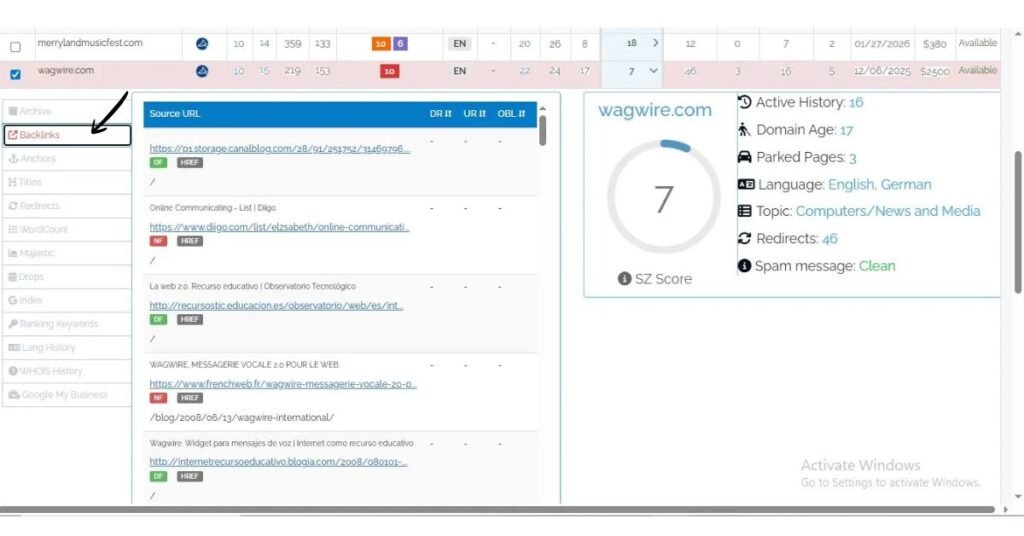
The SZ Score is not perfect. It will not always find the problem. The Anchors tab is better at this. Now I always check the Anchors tab for every domain that I think is good enough to be on my shortlist.
This only takes thirty seconds. I have found that it is worth doing because it has stopped me from making a few choices that I would have regretted later. The SZ Score is still useful. The Anchors tab is more helpful in some cases.
SpamZilla vs Manual Research – What Actually Saved My Time!
I did the work manually for two days to compare results. I found domains using ExpiredDomains.net checked links with Majestic and viewed history with Wayback Machine. I had to open tabs and check each domain individually.
In four hours I could only properly check 15 domains.
Using SpamZilla was much faster. In the four hours I checked over 40 domains because all the information was in one place. I didn’t have to switch between tools.. When I did it manually, I got tired after a while. Started rushing through the checks. With SpamZilla, this was less of a problem because the data was already organised.
SpamZilla doesn’t do the thinking for you. It makes the work faster and easier. SpamZilla helps you get more done in time.
So, Does SpamZilla Always Tell the Truth?
No. And it is better to be clear about this instead of hiding it.
The SZ Score uses data. Like anchor text distributions, redirect patterns, backlink source quality and archived content history.. It is a weighted formula and formulas have flaws. For example the sailboat-technology case showed a domain with a problem that the score did not catch. I have also seen domains with scores in the mid-20s that turned out to be completely clean when I checked them manually.
The score is a tool, for filtering. It is not a decision. A green score means the domain is worth looking into further. It does not mean the domain is safe
Never Miss: Pulsamento – Meaning, Uses, and Why It Matters Today!
It’s Not All Good — Here’s What Bothered Me!
SpamZilla is useful overall, but there are a few things I did not like. The interface looks a bit outdated. Its hard to use on my phone. The free plan has limited features making it tough to really test SpamZilla. I also noticed that the data isn’t always current. I found some domains that were already taken when I checked them again later.
Despite this SpamZilla still works,. These issues make it less enjoyable to use
Who Should Actually Be Paying for SpamZilla Right Now?
SpamZilla is great for people who often work with expired domains and want to save time. If you already use tools like Ahrefs, Majestic and ExpiredDomains.net SpamZilla helps put everything in one place. It’s also good for users who know about SEO metrics like Trust Flow, Citation Flow and backlinks. If you’re just starting out or only check domains sometimes the paid plan might not be worth it. In short, SpamZilla is for serious users who often work with expired domains.
Is $37 a Month Actually Worth It? My Honest Take After Using It!
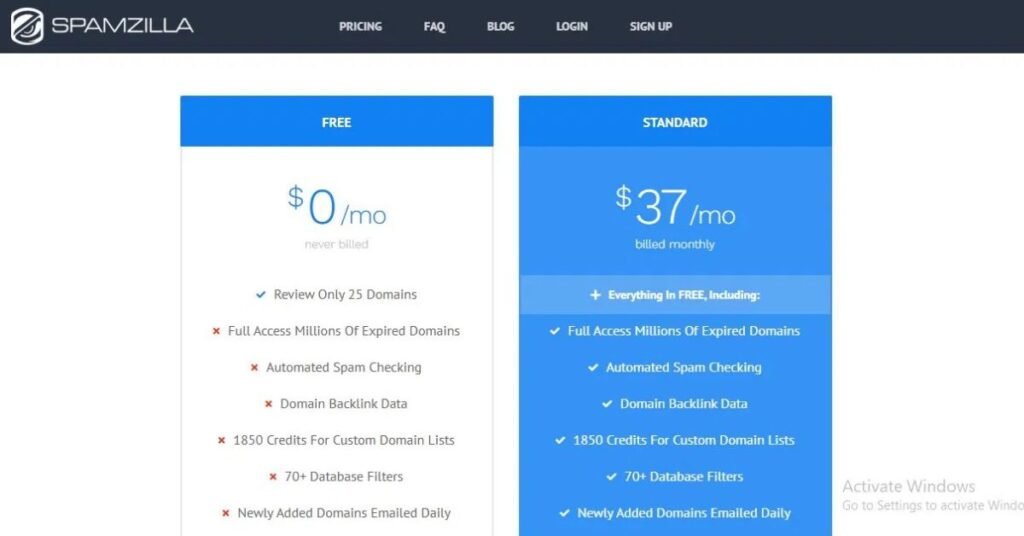
The $37 plan gives you access to the database, spam checks, backlink data, 1,850 credits for custom domain lists over 70 filters and daily email updates. The free plan does not have most of these features.
I think $37 is a price if you use it often, compared to using separate tools like Majestic, Moz and Ahrefs and the time you’d spend doing everything manually. The truth is, SpamZilla doesn’t find domains for you. It mainly helps you avoid bad ones. In 2026, a domain’s history is more important than before. This tool becomes really important.
I’ve been using it for three weeks. I decided to renew my subscription.
The Query Post View:
SpamZilla is not a guarantee that a domain’s good. The SZ Score is a first step but its not the final answer. The spam message field and the Anchors tab have information that the headline score doesn’t always show. And checking the Wayback Machine is still a must for anything
For SEOs who regularly buy domains SpamZilla is worth the cost. For people who only buy domains sometimes paying for a month when they need it is a more practical choice. The big change is that checking a domains history is now more important than ever because Google is more strict, about manipulated histories. SpamZilla doesn’t completely solve this problem. It makes finding the issue much faster.
 Wild Rise
  Admin
Admin